 getontheair
1. What you need
- Ham2K Power Logger: Ham2K’s new app for Windows, macOS, Linux and mobile. It was first announced as HaLo, builds may say “Ham2K Logger” or “Next Edition”, and Ham2K shortens it to PoLo. Version 26.9.0 (build 178) or later, which runs extension API 5 or newer.
- Not the classic Ham2K Portable Logger (the original PoLo phone app). It can’t load add-ons. You can still use the checker with it: export ADIF and drop the file on the checker.
- A PA QSO Party operation in Ham2K Logger (the add-on only works inside one).
- A web browser for the checker. Chrome, Edge, Safari and Firefox all work. Watch a log file needs Chrome or Edge.
2. Install the add-on
- One tap: on the device running Ham2K Logger, open the add-on page (or the box at the top of the checker) and tap Install in Ham2K Logger. Your browser may ask whether to open Ham2K Logger; allow it.
- From a file (if the button does nothing): tap Download .h2kext, then in Ham2K Logger go to Settings → Extensions & Features → Install from file… and pick the file. Pasting the .h2kext link into the search field on that screen works too.
- The consent screen. Ham2K Logger shows what the add-on asks for before installing. PAQP Live asks to reach
getontheair.app(for the update check and Real time mode) and to read the log of the operation you open. Agree to install. Nothing is sent until you turn a mode on. - Check the version under Settings → Extensions & Features: it should say PAQP Live 0.1.5 or later.
3. Add the panel
- Open your PA QSO Party operation.
- Open Layout Setup and add the PAQP Live panel (“Send PA QSO Party contacts to the getontheair.app log checker”).
- Open the panel’s settings with its gear in Layout Setup. You’ll see:
- Send contacts to the checker: Off (send nothing), Link: tap to open in my browser, or Real time via getontheair.app relay.
- Longest link (Link mode): 30,000 characters by default.
- Check getontheair.app for updates to this add-on: Yes, about once a day (sends no log data) or No, never check.
- Pairing code (relay only, shown on the checker page).
PAQP Live · 4100 contacts

Send full log (2 parts; tap each once, in any order):
- Part 1 of 2 · QSOs 1–2250
- Part 2 of 2 · QSOs 2251–4100

After a full send: Send latest changes · QSOs 1751–4100

Tapping opens your browser. The contacts ride in the link itself,
not through any server. Fallback: type PAQPCOPY in the call field
and press space to copy the whole log as text.

How to use PAQP Live
4. The three modes
- Off (send nothing)
- The default. The panel says “PAQP Live is off. Nothing is sent.”
- Link
- The panel shows links. Tapping one opens your browser on the checker with your contacts inside the link. No server is involved. Best when you log and check on the same device.
- Real time
- The add-on keeps a secure connection to getontheair.app’s relay and sends every new, edited or deleted contact within seconds to the checker page you paired with. It also works across devices: log on a phone, watch the score on a PC.
5. Link mode
- Set Send contacts to the checker to Link.
- Send full log. A log that fits in one link shows Send full log (N contacts) to the checker. One link holds about 2,000–2,500 contacts. A bigger log shows Send full log with Part 1 of N, Part 2 of N, and so on. Tap each part once, in any order. Tapping one twice does no harm.
- Watch the checker. It shows something like “Received 2250 of K3XYZ’s contacts (1 of 2 pieces). Still needed: …” and loads the log only when every part has arrived. A part that changed since you last sent it is marked updated.
- Send latest changes. After a full send, tap Send latest changes to bring in your newest contacts. It covers the end of the log (shown as “QSOs 1751–4100”). If you edited an older contact, or the checker finds a gap, it asks you to send the full log again.
- Longest link. If the checker says a link was cut off or damaged, set Longest link to 16,000, 8,000 or 2,000 characters. You’ll get more parts, each one shorter.
- PAQPCOPY, if links won’t open at all: type
PAQPCOPYin the call field and press space. A box titled “PAQP Live: copy your log” shows the whole log as text. Select all (Ctrl+A), copy (Ctrl+C), and paste it into Paste from Ham2K (if links don’t open) on the checker, then tap Load pasted log.
Contacts from links, pastes, dropped files and watched files all merge into what’s loaded: matching contacts are updated, new ones added, and your fix choices kept. Only a complete full send (all parts) or ticking Replace the loaded log instead of merging replaces it.
6. Real time mode
- On the checker, scroll to Live from Ham2K PoLo and tap Pair for real time…. A code like
K7QX-M3PAappears next to the button, and the page says “Paired. In Ham2K Logger, set PAQP Live to Real time and enter K7QX-M3PA in its settings.” - In Ham2K Logger, open the PAQP Live panel’s settings. Set Send contacts to the checker to Real time via getontheair.app relay and type the code into Pairing code (upper or lower case, dash optional). Codes never use 0, O, 1, I or L.
- Within a few seconds:
- the panel says Connected · 1 checker page watching (or “Connected · waiting for the checker page …” if the page isn’t open);
- the checker shows PoLo connected and “Live from PoLo: N contacts from YOURCALL via relay, updated …”.
- Remembered pairing. The checker remembers the code in this browser. Reload the page, close and reopen it, or lose the connection, and it rejoins the same pairing and loads your full log at once, marked “saved copy from …”. Then live updates resume.
- Forget this pairing drops the code from this browser and disconnects. The relay’s copy expires 7 days after the last update. To pair again, tap Pair for real time… for a new code and type it into the add-on.
- The 7-day cache. To let you reload or reconnect, your contacts are cached on getontheair.app for up to 7 days after your last update, then deleted.
Status messages
- Connecting to the relay… / Connecting to relay…
- Normal for a second or two.
- Can’t reach the relay: … Retrying in N s. Link mode still works. (panel)
- Couldn’t reach the relay (…). Retrying in N s. Your code is still … (checker)
- The reason is in the message (no answer, refused, blocked). Both sides keep retrying with a growing delay, so you don’t need to do anything. Link mode works meanwhile.
- That pairing code doesn’t look right.
- Copy it again from the checker; it’s 8 letters and digits.
- PoLo not connected yet (checker)
- The page is paired but Ham2K Logger isn’t. Check the mode and code in the panel settings.
7. Using the checker
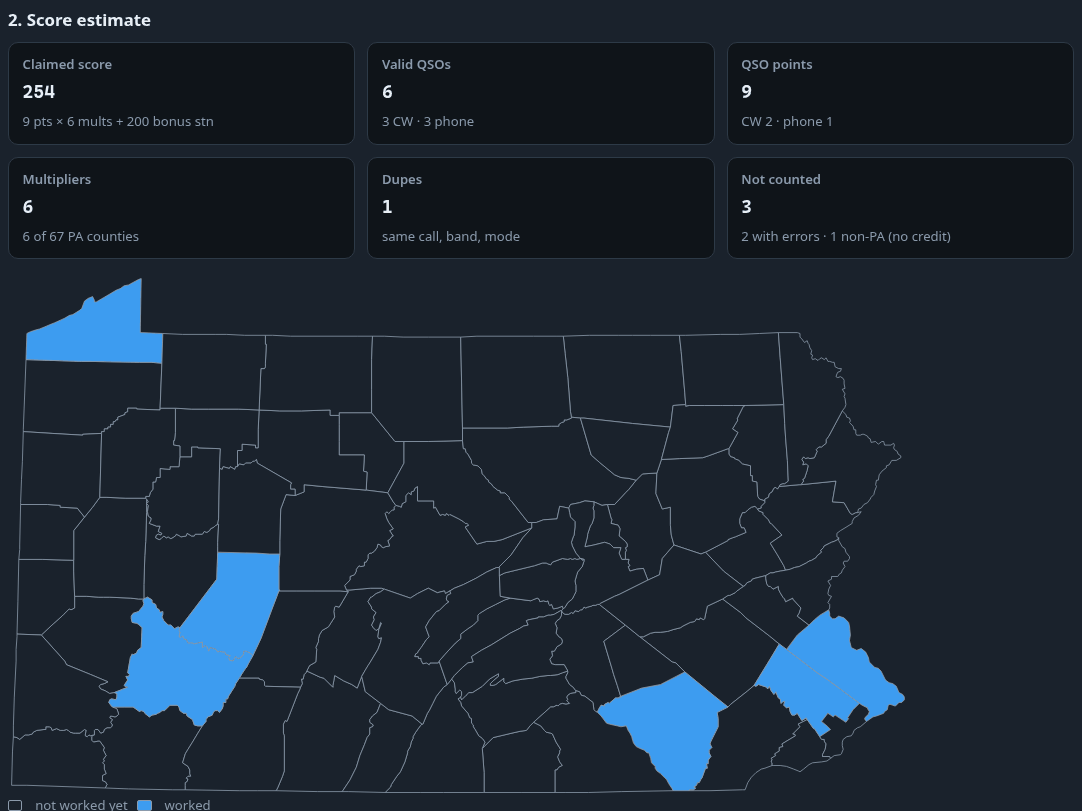
- Where you are. Under Score me as, the checker detects from your sent exchange whether you’re In Pennsylvania (I sent a county) or Outside Pennsylvania (I sent a section or DX). Change it if it guessed wrong. Tick QRP entry or Mobile or rover if they apply.
- 2. Score estimate: claimed score, valid QSOs, QSO points, multipliers, dupes, and contacts not counted.
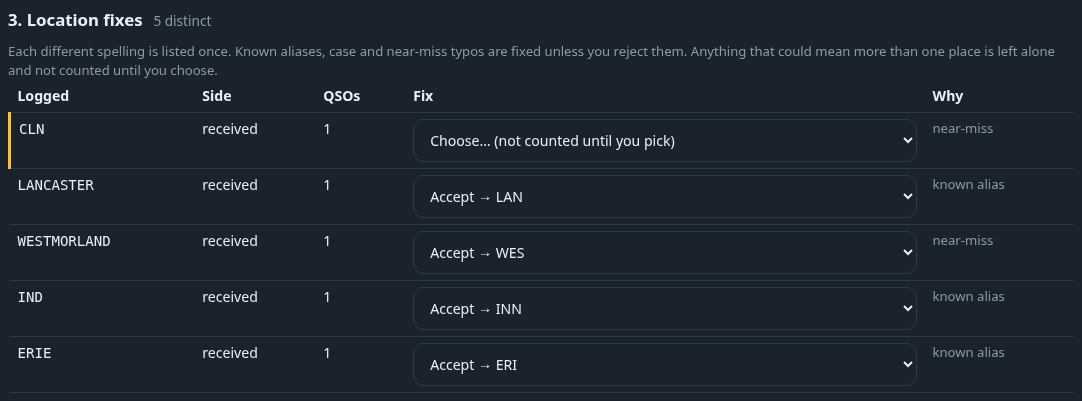
- 3. Location fixes. Every county or section that doesn’t match the official list shows up with what the checker thinks you meant.
- Accept → ALL (the default for clear cases like “Allegheney”) or Reject, keep "…" if you really logged what they sent.
- Ambiguous entries (highlighted) say Choose… (not counted until you pick). For example, “NY” could be ENY, NLI, NNY or WNY, and “MA” could be EMA or WMA. Pick the right section from your notes or the station’s QTH; they don’t count until you do.
- Reset my choices clears them all. Your choices are saved in this browser and kept when new contacts merge in.
- 4. Flagged QSOs: dupes (same station, band and mode; mobiles and rovers again per county), contacts outside the contest periods, 60/30/17/12 m, digital modes, and missing serials or locations. Set Show to errors only to cut the list down.
- 5. Stats: band/mode table, rate by hour, the PA county map (worked counties highlighted; tick Shade by number of QSOs; hover, tap or tab to a county for its count and first-worked time), the 67-county grid, and the More stats sections. Tap each heading to open it: band×mode grid, rates, breaks, multiplier timeline, counties still needed (most active first, using the sponsor’s rare-county data), what’s left to catch (in-PA), stations, county-line contacts and mobiles, K3ZMC bonus, a score projection (an estimate), and Saturday vs Sunday.
8. Export Cabrillo and submit
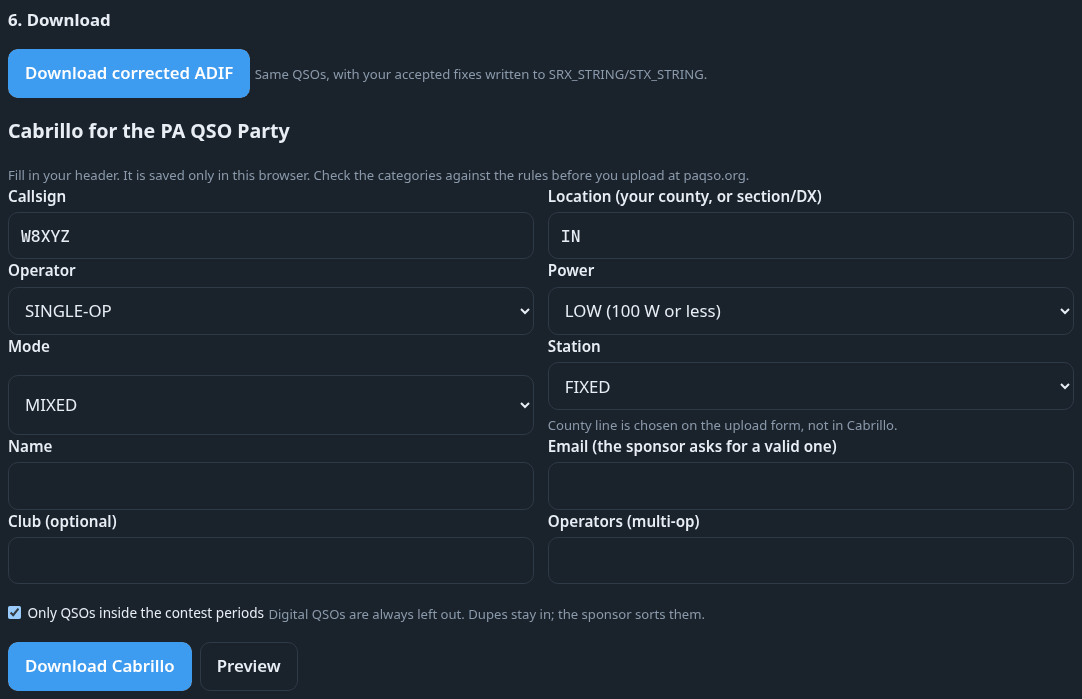
- In 6. Download, fill in the Cabrillo header: Callsign, Location (your county, or section/DX), Operator, Power, Mode, Station, Name, Email (the sponsor asks for a valid one), and optionally Club and Operators (multi-op). They’re saved in this browser.
- Tap Preview to check it, then Download Cabrillo. The file uses the contest name
PA-QSO-PARTYand includes your accepted fixes. Download corrected ADIF gives you the same fixes for your logger. - Check the categories against the rules, then upload at paqso.org log submission by October 18, 2026 (within 7 days of the contest).
9. Updates
About once a day, while the panel is showing, PAQP Live checks latest.json on getontheair.app. When a newer build your app can run is out, the panel shows Update available: 0.1.x with an Install in Ham2K Logger button. It never installs by itself, and Ham2K Logger asks you to confirm. Updating keeps your settings. Turn the check off with Check getontheair.app for updates to this add-on: No, never check. Builds 0.1.2 and older can’t check, so install the latest by hand once.
10. Troubleshooting
- “That extension needs a newer version of this app — it speaks API version 7, this app speaks 5.”
- That was the 0.1.0 test build. Install the current build (“-api5” in the name) from the add-on page. It runs on Ham2K Logger 26.9.0 (build 178) and later.
- The checker says a link was cut off or damaged
- Lower Longest link in the panel settings and tap again, or use
PAQPCOPYand paste. - Can’t reach the relay / Couldn’t reach the relay
- Check your internet connection. Some hotel, school and work networks block it. Both sides retry by themselves, and Link mode keeps working meanwhile.
- The panel is empty or says “Open a PA QSO Party operation to use this panel.”
- Open your PA QSO Party operation, not a general log. If it says PAQP Live is off, pick Link or Real time in its settings. If it says “This app version doesn’t let add-ons read the log”, update Ham2K Logger.
- My contacts show states (NY, CA, TX, MA) where a section should be
- In-state stations score ARRL/RAC sections, and some states have several. The checker lists these as ambiguous fixes, so pick the section for each one. One-section states like OH are already fine.
- “Still needed: QSOs …”
- Tap the remaining parts of Send full log, in any order.
- The score dropped after a link came in
- It shouldn’t. Partial links merge into what’s loaded. If you ticked Replace the loaded log instead of merging, untick it and send the full log again.
- Install in Ham2K Logger does nothing
- Download the .h2kext and use Install from file… (section 2).
Still stuck? Email KB3CMT with what the panel and the checker say.
11. Privacy
- Off by default. Nothing is sent until you choose a mode.
- What’s sent: only your PA QSO Party contacts’ time (to the minute), callsign, band, mode, frequency, sent serial and county, and received serial and county/section, plus your own station call, your sent county and a short random id for the operation.
- Link mode carries them inside the link, after the
#, which browsers never send to a server. They stay in your browser. - Real time: sends your QSOs to our relay on getontheair.app. To let you reload or reconnect, it keeps them on disk for up to 7 days after the last update, then deletes them. Forget this pairing clears the pairing in your browser; it doesn’t delete the relay’s copy, which expires on its own. The cache file is named by a one-way hash of the pairing code, and nothing about your contacts goes into the server’s logs. Only pages on getontheair.app can join a pairing.
- The update check is a plain request for latest.json, with no log data.
- File checks run in your browser. Logs you drop or paste aren’t uploaded. Fix choices, header fields and contacts received from the add-on stay in that browser’s storage until you clear them.
12. FAQ
- Does the checker’s score count?
- No. It’s an estimate. The sponsor rescores every Cabrillo log.
- Can I use it without the add-on?
- Yes. Export ADIF or Cabrillo from any logger and drop it on the checker, or use Watch a log file… (Chrome/Edge) to re-read it every 10–60 s.
- I’m outside PA. What are my multipliers?
- The 67 PA counties. The map and the county grid show which you have.
- I’m in PA. What are mine?
- PA counties, plus ARRL/RAC sections, plus 1 for DX. EPA and WPA count as soon as you work any county in them.
- Do off-times matter in the PA QSO Party?
- No. There’s no minimum off-time rule; you can operate any part of either period. The checker lists your breaks only for planning.
- What is K3ZMC?
- The bonus station: 200 points for each valid QSO with it on a new band/mode.
- Does it work on a phone?
- Yes. Ham2K Logger on a phone can use Link or Real time, and the checker works in phone browsers. In Real time you can watch on a PC while you log on the phone.
- Can several people watch my score?
- Up to five checker pages can share one pairing code.
- How do I start over?
- On the checker, tap Clear loaded log, Forget contacts received from PoLo and Forget this pairing.