 getontheair
ADIF fields: parks, grids, and how to add them
ADIF is the pipe between the park and every award system. If the tag is wrong, POTA still might accept the file while LoTW, Recap Cards, and your shack log silently drop the park or the grid.
Canonical spec: ADIF 3.1.7 (adif.org / adif.org.uk). This page is a field guide, not a fork of the spec.
The two directions that confuse everyone
| Tag | Whose station | Typical POTA value |
|---|---|---|
MY_SIG | You (activator) | POTA |
MY_SIG_INFO | You | US-1356 (your park) |
MY_POTA_REF | You | US-1356 or US-1356,US-4516 for a 2-fer |
SIG | Them (hunter or P2P activator) | POTA |
SIG_INFO | Them | their park |
POTA_REF | Them | same idea, ADIF 3.1.5+ list form |
MY_SOTA_REF | You | W3/SV-001 |
SOTA_REF | Them | their summit |
MY_GRIDSQUARE | You | FN00aa (4, 6, or 8 characters) |
GRIDSQUARE | Them | hunter grid from lookup or what they said |
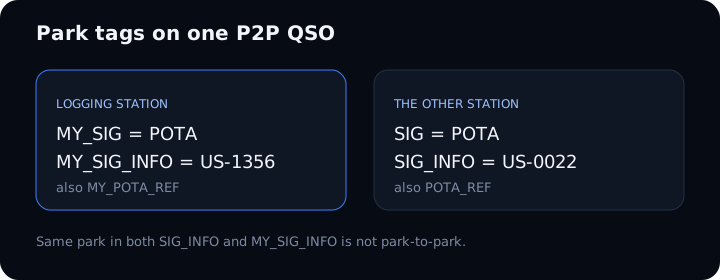
MY_ always means the logging station. Recap Cards on this site plot your position from MY_GRIDSQUARE and hunters from GRIDSQUARE. If Recap’s map is empty, the ADIF never had those tags — not a bug in the canvas.
Printable: adif-fields-cheatsheet.txt
A real QSO in ADIF
Download: sample-pota-qso.adi
<CALL:4>W1AW
<QSO_DATE:8>20260831
<TIME_ON:4>1412
<BAND:3>20M
<MODE:3>SSB
<RST_SENT:2>59
<RST_RCVD:2>59
<GRIDSQUARE:6>FN31pr
<STATE:2>CT
<STATION_CALLSIGN:6>KB3CMT
<MY_GRIDSQUARE:6>FN00aa
<MY_SIG:4>POTA
<MY_SIG_INFO:7>US-1356
<MY_POTA_REF:7>US-1356
<SIG:4>POTA
<SIG_INFO:7>US-0022
<POTA_REF:7>US-0022
<EOR>
Park-to-park is SIG_INFO / POTA_REF different from MY_SIG_INFO. Same park in both fields is not P2P.
POTA P2P pairing has used a ~15 minute time window on TIME_ON plus matching band/mode/calls. If Polo is five minutes off UTC and the other activator is on GPS time, the P2P never pairs. Confirm the current matcher on docs.pota.app — Park to Park.
Hunter 2-fers / 3-fers: one physical QSO, one ADIF line per their park in SIG_INFO. A comma list in one row is what ADIF Doctor explodes. If you work a three-fer activator and log one line, you get one P2P and two hunter credits — not three P2P.
Your 2-fer: comma list in MY_POTA_REF / MY_SIG_INFO or two files. Polo writes two POTA exports. Doctor explodes. Do not upload Full to pota.app.
STATION_CALLSIGN is what went over the air. OPERATOR is who sat at the mic. They must not be the same person working themselves. Club logs need both on every line and upload under the club account — N3FJP · Support Your Parks ops card. Some recent Polo exports drop OPERATOR; ADIF Doctor warns when a club or WWFF log is missing it.
How to get a gridsquare
You need two grids: yours (MY_GRIDSQUARE) and theirs (GRIDSQUARE).

Yours (the parking-lot / picnic-table grid)
- Phone GPS / Polo Operation Location — most mapping apps show a 6-character Maidenhead. Organic Maps, Gaia, and many ham apps do. Write it on the field sheet before you lose cell.
- Do not blindly trust Polo’s park-centroid grid. Polo fills
MY_GRIDSQUAREfrom the center of the park polygon when you pick the activity. A trailhead on the other side of the unit can be a different 6-character square. Override with GPS or type it. Official: Polo Mapping. - Radio — IC-705 GPS (when the receiver has a fix) can display grid. Do not trust a cold start in a metal picnic shelter.
- Park reference — the Grid helper looks up a park's listed grid from its POTA reference and flags a logged grid with the wrong length (5 or 7 characters). The listed point is often a park office or centroid, so treat it as a sanity check, not your picnic table.
- Map — Grid Map / Maidenhead grid square map / QRZ grid lookup / any Maidenhead map. 6 characters (
FN00aa) is the field standard. 4 characters (FN00) is a 1° × 2° blob — Recap can still plot it, badly. - Do not reuse your home grid for a park 80 miles away. LoTW Station Location and
MY_GRIDSQUAREshould match this sitting.
Theirs (the hunter)
- Callbook lookup while you have data: QRZ XML paid is the one that returns a grid. Free QRZ XML is name/address/country only — Polo will then plot country or state centroids. HamQTH / HamDB (US/CA/DE) are backups. Polo: Settings → Accounts → QRZ, login with callsign not email, Check Credentials.
- They say it. Rare on SSB POTA; common on SOTA and some CW.
- Polo after a dead zone: QSO list → Lookup All once you have cell. Or open the QSO → More → type
GRIDSQUARE. - After the fact in AC Log: import the Full Polo export (not the POTA export), then
Edit > Fill Fields Determined by Call. That backfills from the callbook, not from magic.
Polo gotcha (this bites everyone once)
Polo’s POTA export is stripped for privacy. It is meant for pota.app and does not include grids. The Full ADIF export includes GRIDSQUARE / MY_GRIDSQUARE and lookup data. Use:
| Destination | Polo file |
|---|---|
| pota.app | POTA export (one file per park on a 2-fer) |
| sotadata | SOTA export |
| WWFF manager | WWFF export |
| N3FJP / Recap / LoTW home log | Full export |
Details: Polo exports & privacy.
How to add ADIF fields in N3FJP AC Log
AC Log will not invent park tags. You name Other fields with the exact ADIF tag. That name is the export/import tag.
Path: Settings → Other Field Titles and Fill Behavior
Recommended field titles (type them exactly, uppercase, underscores):
| Other slot | Title (ADIF tag) | Fill behavior | What you type |
|---|---|---|---|
| Other1 | MY_SIG | Previous record | POTA |
| Other2 | MY_SIG_INFO | Previous record | US-1356 |
| Other3 | SIG | (blank / do not fill) | POTA on P2P only |
| Other4 | SIG_INFO | (blank) | hunter park, P2P only |
N3FJP’s own four-step FAQ uses a shorter pair (SIG_INFO + MY_SIG_INFO on Other1/Other2). That is enough for a basic POTA upload. The four-field layout above is what the POTA N3FJP guide (W0ZAP) describes and is what you want if you log P2P without hand-editing ADIF later.
2-fer you are activating: put both parks in MY_SIG_INFO or MY_POTA_REF as a comma list if your AC Log version emits MY_POTA_REF. Confirm a test QSO export before the real activation.
Printable cheat sheet: n3fjp-other-fields.txt
Show the grid field
- Settings → Edit Fields Displayed, Position and Tab Order
- Find Grid Square (hunter) and My Grid / Setup grid (you).
- Check Visible on Main Form.
- Uncheck Enable Repositioning before you leave that screen or the next mouse twitch wrecks the layout.
Station grid for the sitting: Settings → Setup (AC Log 6.7+). Change it when you change parks. It does not change your TQSL Station Location — that is a separate LoTW job. One Location per grid/state you actually operated from.
Club / 1×1: STATION_CALLSIGN vs OPERATOR — N3FJP.
Load the stock POTA layout
AC Log 7.0.4+ ships POTAConfig.efl.
- Save your current layout first (same screen, enable dragging, save a name, disable dragging).
- Settings → Edit Fields Displayed → Load a Saved Configuration →
POTAConfig.efl - Then still set Other titles as above. The
.eflis layout/tab order, not the Other-field names file.
Official steps: n3fjp.com FAQ — configure AC Log for POTA.
How Polo gets the same fields
You do not type ADIF tags in Polo. You set the activity (POTA park on the operation). Polo writes MY_SIG / MY_SIG_INFO / MY_POTA_REF on export.
- P2P: type the other park in the POTA field on the QSO (often just
2518— Polo fills the prefix). That becomesSIG_INFO/POTA_REF. - Grid: enable GPS on the operation for
MY_GRIDSQUARE. Hunter grids come from lookup (QRZ subscription helps) and appear on the Full export.
After export: Doctor, Recap, LoTW, POTA
- ADIF Doctor — drop the file. It will say if 2-fers need exploding, if this looks like a privacy-stripped POTA export, and it will name the downloads
CALL@US-1234-YYYYMMDD.adi. - Open the ADIF in a text editor only if you enjoy pain. Search for
MY_GRIDSQUAREandMY_SIG_INFO. If they are missing, stamp them in Doctor — do not upload yet. - Recap Cards — contact map needs hunter grids (Full file, or Doctor → Open Recap with Full).
- POTA portal — use the POTA pack from Doctor, not Full.
- TQSL — Station Location must match this grid, not your basement.
Habits / gotchas / checklist (ADIF)
Next: Polo how-to · N3FJP how-to
Notes & edits
Comments and proposed markdown sit in a queue. Nothing is public until it is reviewed. How this works.