 getontheair
Ham2K Polo — complete field how-to
Polo (Ham2K Portable Logger) is the phone logger this guide assumes in the field. It is not the award system. It is not N3FJP. It does not replace a paper log.
Official manual: polo.ham2k.com/docs First sitting: Your First Operation Exports & privacy: Log Exports & Privacy Tips: Tips and Tricks Settings: Logger Settings Install: App Store / Google Play / GitHub (MPL 2.0)
Which Polo? (October 2026)
Ham2K has two loggers out right now, and both get called “PoLo.” This page is written for the phone app.
| App | What it is | Get it |
|---|---|---|
| Ham2K Portable Logger (phone / tablet) | The field logger this page covers. Stable releases. | App Store / Google Play |
| Ham2K Power Logger (desktop and more) | The next-generation logger. Announced 2026-09-17 under its new name (it was first called “HaLo”). Still alpha: features are still being moved over, and Ham2K warns that things may break. Windows, macOS, Linux and more. | ham2k.com/downloads |
- Rig control (CAT) is in Power Logger, not the phone app. It is experimental: type
EXP CATin the Quick Lookup or Their Call box, then look under Settings for Station Configuration. Ham2K has said CAT will not be backported to the old phone app. - Known rig-control bug (reported 2026-10-03): on Linux, Power Logger build 177 connected to an FTDX10 and then dropped CAT and the CW keyer a few seconds later. The previous build reportedly worked. Before a park day, don't install a new alpha build the night before, keep the last installer that worked, and be ready to set band and mode by hand.
- Missing features: some phone-app features (auto re-spot, for example) have not reached the Power Logger alpha yet. Keep the phone app as your field backup.
- Status changes week to week. Check the Ham2K forum before you rely on an alpha in the field.
Watch before the first park (official):
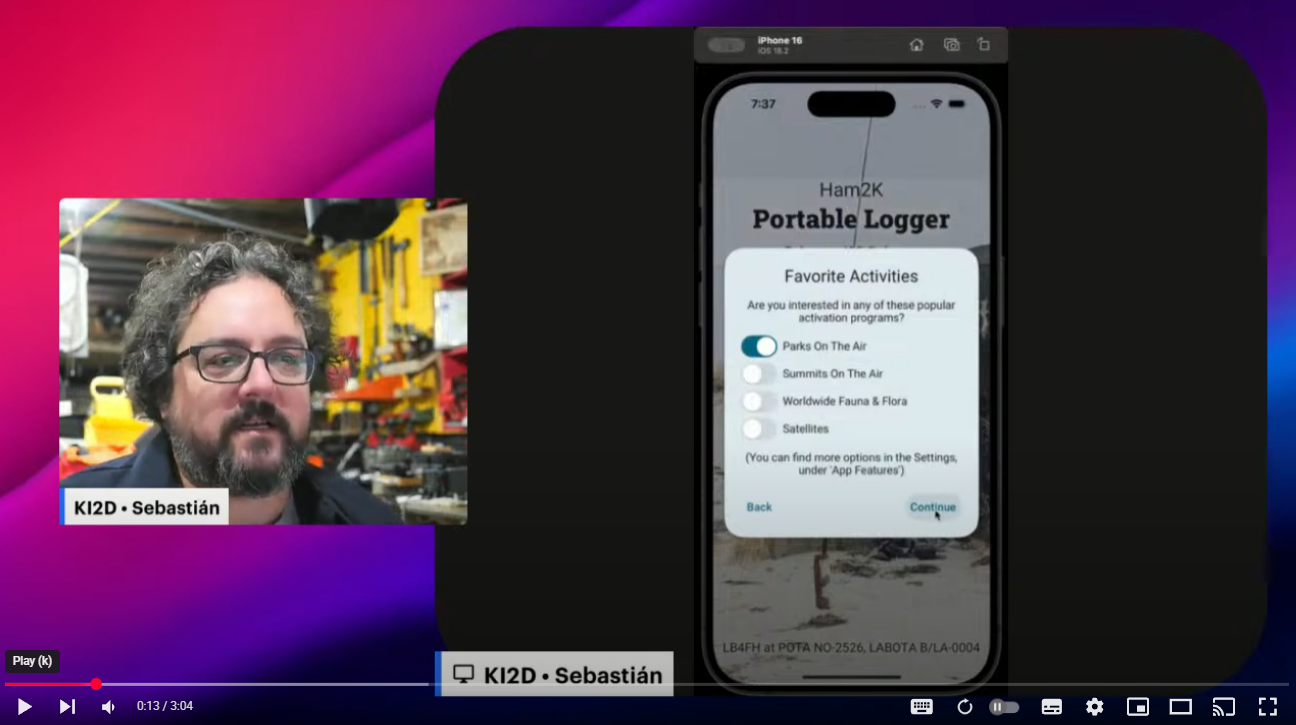
- Your First Operation — live demo (the video Polo’s own docs embed)
- Ham2K Apps YouTube — How-Tos playlist
- SWFL Hamfest walkthrough
Screenshots below are from the Polo docs repo (Apache 2.0). Attribution: NOTICE.
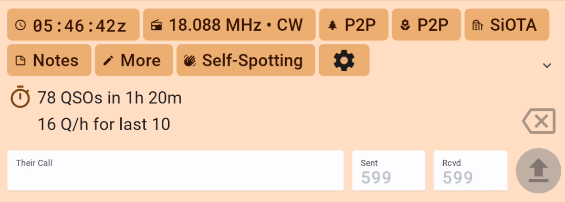
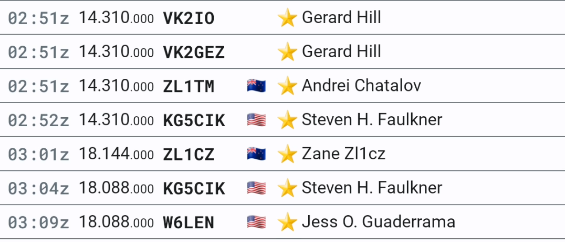
Mental model: Operation vs QSO vs Activity
| Word in Polo | What it actually is |
|---|---|
| Operation | The sitting. One picnic table, one afternoon, one set of exports. |
| Activity | The award hook on that sitting: POTA park, SOTA summit, WWFF, etc. A 2-fer is two POTA activities on the same operation. |
| QSO | One row. Call, time, band, mode, reports, optional their-park. |
| Export | Not “the log.” Several files, each stripped for a different destination. |
If you skip the activity, Polo cannot write MY_SIG_INFO. POTA will reject the upload even though every QSO looks fine on the phone.
Day-zero setup (do this at home)
- Install Polo. Open the cog on the operations list.
- Set operator callsign. Everything else is optional until this is right.
- Logging settings worth flipping now:
- Left-handed Send button if that is you. - RST sent-first vs received-first — pick one and never change it mid-pileup. - Jump to next field on entry if you like. - Enable the numbers row if your phone keyboard hides digits. - Bands/modes list: shrink it to what you actually run (20/40/15 SSB+CW is a sane POTA set).
- Lookups: QRZ XML paid is what actually returns hunter grids. Free QRZ XML returns name/address/country only — no grid. HamDB (free, US/CA/DE) and HamQTH are other App Feature sources. QRZ API login is callsign + password, not email. Avoid exotic password characters. Use Check Credentials until it ticks.
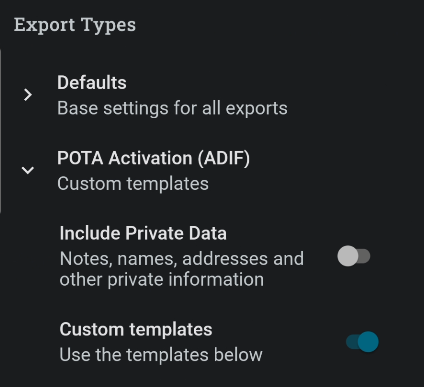
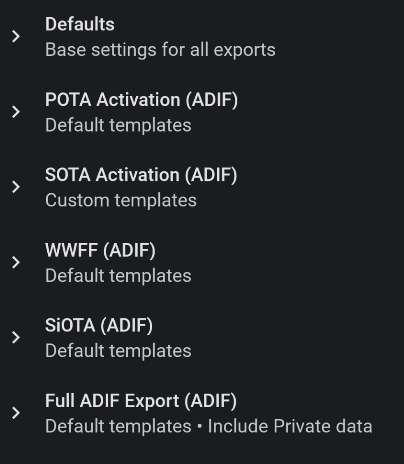
- Export settings: leave Include Private Data off unless you know why you want names and addresses in a file you might email.
- Refresh offline park/summit data at home (Data Settings). Unknown-park in the field usually means the data file is stale.
- Optional: import your shack ADIF as Call History so dead-zone lookups still have names.

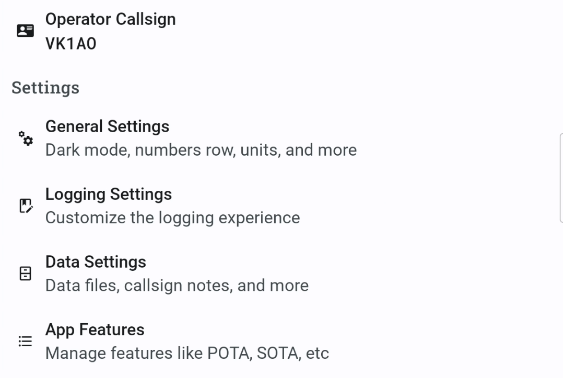
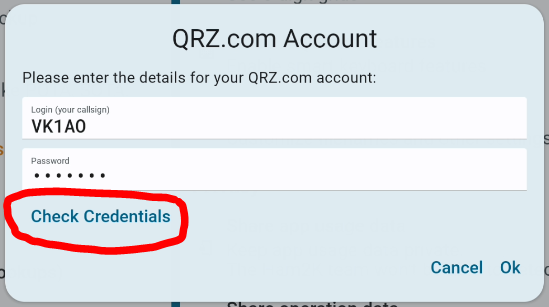
Full settings tour: polo.ham2k.com/docs/polo-features/settings. Lookups: Data Lookups.
Your first POTA operation (click-by-click)
Official companion: Your First Operation.
- New operation. Name it something you will recognize at midnight (
US-1356 2026-08-31). - Open Operation (or Controls) and add the POTA activity. Type the park (
US-1356or just1356— Polo fills the entity prefix once it knows you). - Confirm location / GPS. That is how
MY_GRIDSQUAREgets on the Full export. Wait for a fix. A metal picnic shelter will lie to you. - On the QSOs tab, set band and mode before the first caller. Polo remembers the last pair; that is how you accidentally log 40 m QSOs as 20 m.
- Type the callsign. Tap Send (or the keyboard Send). That logs the QSO with current time, band, mode, and default reports.
- Need their park (P2P)? Put it in the POTA / their-ref field on that QSO. Many operators type just
2518; Polo expands toUS-2518. That becomesSIG_INFO/POTA_REFon export. - Need a different RST? Space to the report fields before Send, or edit the row after.
- When you QRT: Operation → Export Log Files. Do not share one file with the world.
Official walkthrough still: Your First Operation.

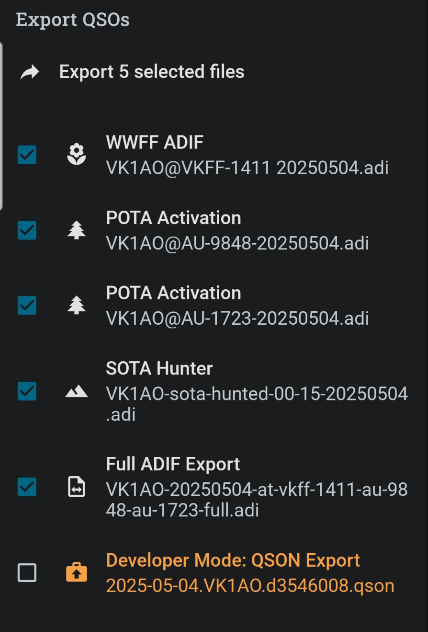
Polo exports two files
Same sitting, two destinations: POTA export → pota.app; Full → Recap / LoTW / QRZ / N3FJP. Details and the which-file table live in ADIF fields & grids. Stuck? ADIF Doctor diagnoses privacy exports and hands Full to Recap.
Which file to export (read this twice)
Polo will offer several ADIFs from one sitting. They are not interchangeable.
| File Polo offers | Put it here | Grids? | Names / lookup? |
|---|---|---|---|
| POTA (one file per park on a 2-fer) | pota.app My Log Uploads | No (privacy strip) | No |
| SOTA | sotadata.org.uk | Program minimum | No |
| WWFF | Your national log manager | Program minimum | No |
| Full ADIF | N3FJP, Recap Cards, your shack log, LoTW via TQSL | Yes | Yes — yours, do not email this to strangers |
A 2-fer POTA sitting produces two POTA files (one per MY_POTA_REF) plus one Full file. Upload each POTA file to pota.app. Import the Full file into AC Log.
If Recap’s map is empty after a Polo activation, you fed it the POTA export. Use Full.
OPERATOR export bug (reported 2026-10-03/04): some current Polo builds export STATION_CALLSIGN but leave out OPERATOR, even when the operation shows both. A Ham2K forum moderator says the next update reverts this (forum thread). That breaks club logs (operators lose personal credit) and some WWFF checkers. Search the export for <OPERATOR:, or drop it into ADIF Doctor, which warns. Club workaround: Support Your Parks ops card.
Override (not recommended for award uploads): General Settings → Export Settings → Include Private Data. That stuffs lookup data into the program-specific files. Polo’s own warning: once you pass on someone else’s QRZ data, you do not control it.
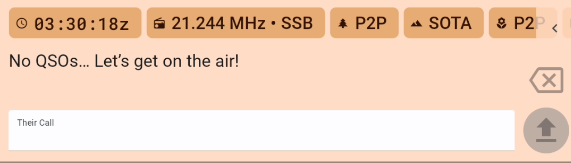
Callsign-box shortcuts (keep this in the lid of the kit)
Polo treats the callsign field as a command line. Type the command, then Send. Official list: Tips and Tricks. Printable: polo-callsign-shortcuts.txt
| Type, then Send | What happens |
|---|---|
W1AW | Log that call on current band/mode/time |
W1AW,K1JT | Two QSOs, same rest of the exchange (multi-op P2P) |
20m | Change band to 20 m |
CW or SSB or FT8 | Change mode |
14.074 or 14074 | Set frequency (and band) |
.247 | Nudge only the decimal (14.245 → 14.247) |
5W or 100W | Set power |
14:30 | Set QSO time (pauses the clock until you go back to now) |
14:30:25 | Time with seconds |
05-09 | Date May 9 |
+15m / -1h | Offset time. Units: s m h d w |
-1d | Paper-log catch-up: yesterday |
QRV / QSY / QRT | Self-spot with that comment |
SPOTME or SPME | Self-spot, frequency + mode, no comment |
OP/W3XYZ or OPER/W3XYZ | Change operator |
| Space | Jump to the next field (keep hands on keyboard) |
. instead of / | WV3H.VE → WV3H/VE (phone keyboards hate slash) |
Empty RST fields log as 59. Tap-and-hold a frequency or reference to replace the whole value without mashing backspace.
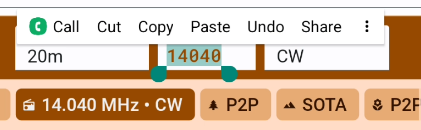
Paper-log catch-up: set date (05-09), set time (14:55), set band (40m), set mode (CW), then type calls. Consecutive entries advance one minute each. The clock stays paused until you tap time → Back to now.
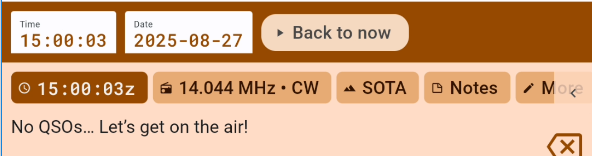
KONAMI toggles developer mode. You do not need it in a park.
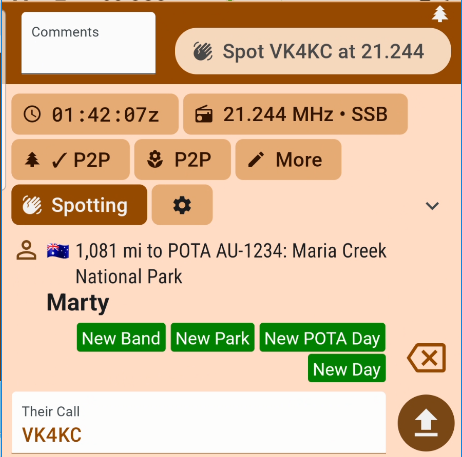
P2P / S2S typing: letters and numbers only — Polo fills dashes. Often you can skip the prefix: 2518 for a US hunter park, VK1AC001 for VK1/AC-001.
2-fer, 3-fer, and dual-program sittings
- Add each POTA park as an activity on the same operation.
- Polo writes a separate POTA ADIF per park. Do not merge them in a text editor unless you enjoy failed uploads.
- On a single QSO, multiple hunter parks can go in the POTA field separated by comma or space; Polo expands that to separate QSO rows in the ADIF.
- A SOTA summit inside a POTA unit: add both activities. Meet both rule sets (vehicle, power, AZ) or you are lying to one program. See program comparison.
- WWFF on the same fence line is a third activity and a third export.
- Other activities Polo already ships (GMA, WWBOTA, SiOTA, ZLOTA, AMSAT, custom
SIG_INFOprograms): Supported activities.
Gridsquare in Polo
Yours:
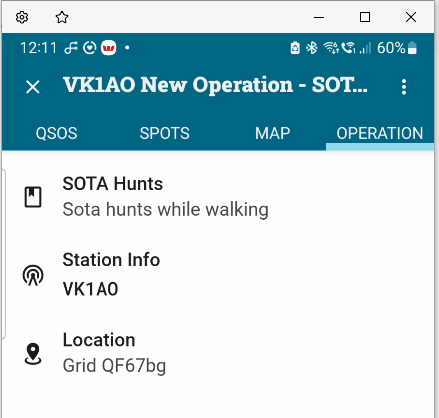
- If the activity is a park or summit, Polo fills a grid from the centroid of that reference. A long trail that crosses a grid line will be wrong. Override with device GPS or type the Maidenhead in Operation → Location.
- Confirm the 6-character grid on the Operation tab before CQ. Write it on the field sheet.
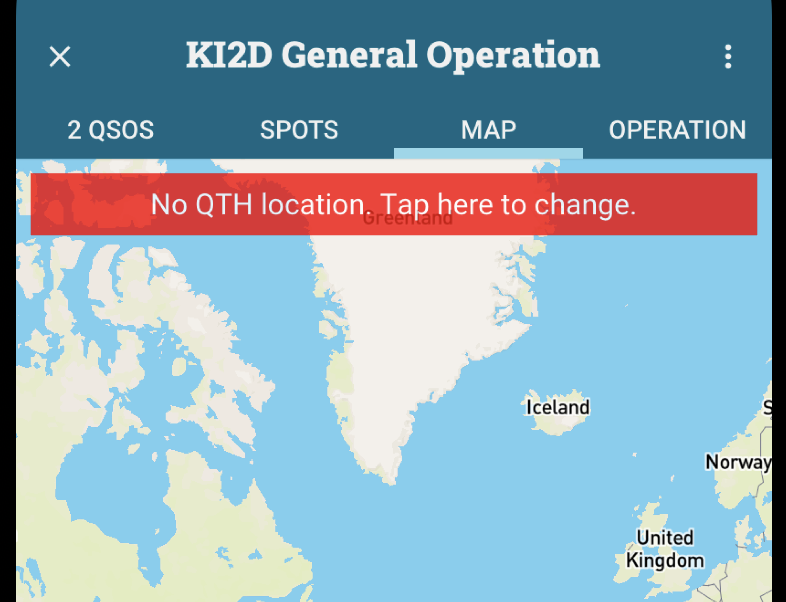
- No location set → Polo’s map warns you. Full ADIF →
MY_GRIDSQUARE.
Theirs:
- Paid QRZ XML returns
GRIDSQUARE. Free QRZ does not. HamDB covers US/CA/DE only. - Free-QRZ maps collapse hunters to country or state centroids (vanity calls often land in the middle of the Lower 48). That is not a Recap bug.
- After cell returns: QSO list ellipsis → Lookup All.
- Still wrong: QSO → More → edit gridsquare by hand.
- Or they give it (SOTA more than POTA SSB).
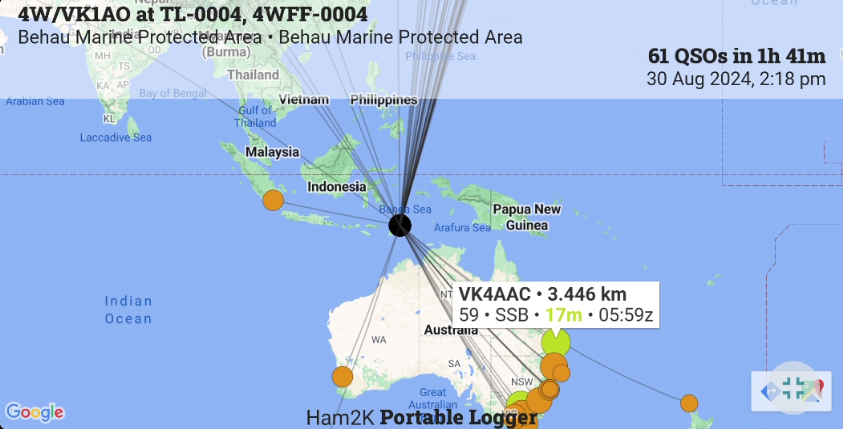
POTA export: grids stripped. That is intentional. Deep dive: ADIF fields & grids. Official: Mapping FAQ.
CAT, Bluetooth, and not fighting the radio
Polo can follow frequency/mode from a radio when you set that up (Hamlib / supported BLE, depending on platform and radio). If CAT is flaky in the sun, set band/mode manually with the shortcuts above and keep logging. A wrong band in the ADIF is worse than no CAT.
Desktop Power Logger (alpha) is where Ham2K's new CAT support lives. See Which Polo? above for the EXP CAT switch and the October 2026 build-177 rig-control bug. The phone app is not getting CAT backported.
IC-705 USB audio is a separate problem from CAT. For Net Scribe, pick the 705 USB codec; for Polo, you only need CAT if you want the frequency filled for you.
After the sitting
- Export POTA (per park) → pota.app (or run the POTA pack out of ADIF Doctor if you need explode/stamp).
- Export Full → files app / email to yourself / USB.
- If you also ran WSJT-X or FLdigi, merge that ADIF with Full in Doctor (de-dupe). Do not upload two overlapping files to pota.app.
- Open Full (or Doctor → Open Recap with Full) in Recap. Empty map = you fed it the privacy-stripped POTA export.
- Import Full into N3FJP AC Log at home (
File → Import). - TQSL the home-log ADIF with a Station Location that matches this grid.
SOTA upload tip: sometimes the last QSOs in an uploaded ADIF show up as blank rows in the sotadata.org.uk verify list, even though the file has them. Press Validate log again. Operators on the SOTA reflector (October 2026) report that the missing rows reappear and the button changes to Upload log. If they are still blank, delete that incomplete upload and upload the same ADIF again (SOTA reflector thread). Count your rows before you leave the page.
Paper log stays in the kit until the ADIF has survived a test open in a text editor. Search for MY_SIG_INFO and <EOR>.
What Polo will not do
- It will not be your LoTW Station Location.
- It will not be N3FJP’s Other-field mapping.
- It will not remember a park you forgot to add as an activity.
- It is not HAMRS. This guide does not cover HAMRS.
Next: N3FJP AC Log · Shortcut sheet (Polo + AC Log) · ADIF & grids
Habits / gotchas / checklist (Polo)
Notes & edits
Comments and proposed markdown sit in a queue. Nothing is public until it is reviewed. How this works.